
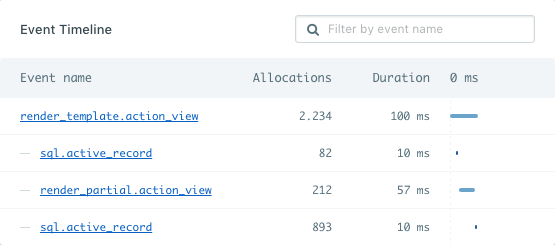
Instrumentation helpers
When you add custom instrumentation to your code you’ll be able to receive even more insights into your application. For example, you have to work with an external API that fetches articles for your homepage:article_fetcher in this
case) and individual events took.
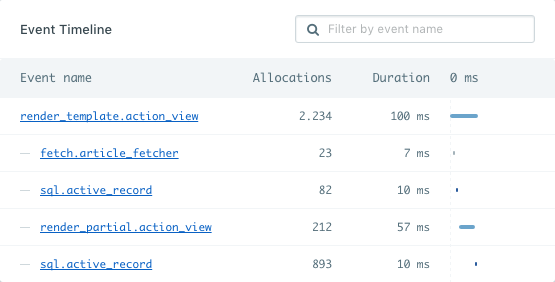
Nesting instrumentation
You can use as many instruments in any combination you like. You can nest instrument calls and AppSignal will handle the nesting and aggregates of the measurements nicely. You just have to keep the final segment (after the last dot) of the key consistent.Collecting more data per event
By default AppSignal will collect the duration of an event and send it to our servers. Since custom instrumentation is not hooked up to any framework internals you might need to pass along more data if you want event details to show up in AppSignal. This can be a descriptive title, or more specific information like the query from a database call. We already do this for ActiveRecord, Sequel, Redis, MongoDB, Sinatra, Grape, and more. There are two helpers to allow you to instrument your code with AppSignal.name argument
The name of the event that will appear in the event tree in AppSignal.
Read more about event key naming.
title argument
A more descriptive title of an event, such as "Fetch current user" or "Fetch blog post comments". It will appear next to the event name in the event tree
on the performance trace page to provide a little more context on what’s
happening.
category (title). The example above is recorded as fetch.custom_database (Fetch current user). An event with no title is named after its category alone, and a title that matches the category is not repeated.
body argument
More details such as a database query that was used by the event.
body_format = Appsignal::EventFormatter::SQL_BODY_FORMAT to do so.
body_format argument
Body format supports formatters to scrub the given data in the body argument
to remove any sensitive data from the value. There are currently two supported
values for the body_format argument.
Appsignal::EventFormatter::DEFAULT value
The Appsignal::EventFormatter::DEFAULT is the default value of this
argument. By default AppSignal will leave the value intact and not scrub any
data from it.
Appsignal::EventFormatter::SQL_BODY_FORMAT value
The Appsignal::EventFormatter::SQL_BODY_FORMAT value will run your data
through the SQL sanitizer and scrub any values in SQL queries.
We recommend you use the Appsignal.instrument_sql helper for this instead.
ActiveSupport::Notifications
The method for instrumenting your code usingActiveSupport::Notifications
is very similar to how AppSignal does it. Using the article fetcher example
again you can see the differences are quite small.
Also see our documentation on AppSignal event formatters when using ActiveSupport::Notifications.
For more information about ActiveSupport::Notifications instrumentation, see the official Rails ActiveSupport::Notifications documentation.
ActiveSupport::Notifications is highly flexible, you can instrument your code
any way you like. More information about ActiveSupport::Notifications can be
found in the
Rails API docs.
Dry::Monitor::Notifications
AppSignal records events instrumented throughDry::Monitor::Notifications, the notification system used by the dry-rb libraries and by ROM.
.dry. The example above is recorded as a fetch_articles.dry event. An event formatter can give an event a name of its own instead. Read more about how AppSignal uses event names in our event naming guide.