Discord describes themselves as the easiest way to communicate over voice, video, and text, whether you’re part of a school club, a nightly gaming group, a worldwide art community, or just a handful of friends that want to hang out. With this integration you will be able to receive notifications for deploys, errors, performance issues and alerts from AppSignal on Discord. Website: Discordapp.com

On Discordapp.com

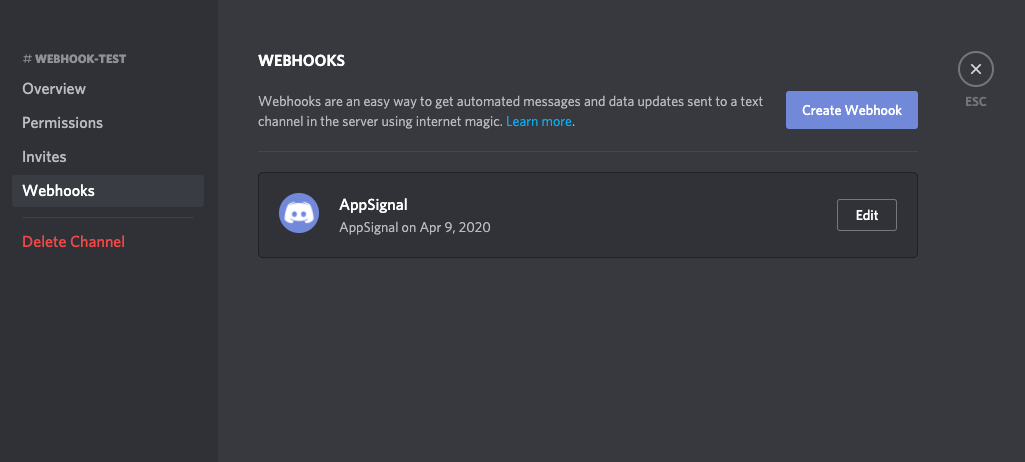
To create a webhook, click the Settings cog for the desired channel and navigate to the “webhooks” section of the settings page. Screenshot of Discord webhooks page Click “Create webhook” to add a new webhook. You can use the following icon: AppSignal logo (right click and save-as). Copy the webhook URL and save the integration.
On Appsignal.com

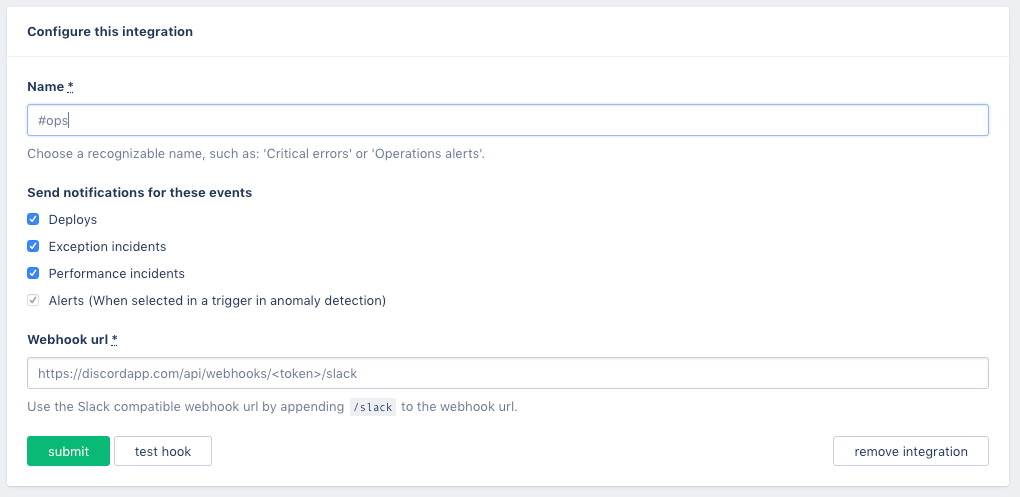
Go to the Notifications page in your AppSignal organization, select Add new notifier and choose Discord from the list of notifiers. Our Discord integration relies on the slack compatible webhook endpoint on Discord, for the webhook, paste the webhook from the Discord integration screen and append /slack to the url. Screenshot of Discord notifier page on AppSignal.com Save the integration, then select Test hook to verify it is working. You are now ready to receive notifications for deploys, errors, performance issues and alerts from AppSignal on Discord!
Integrations list